
What is website migration?

From a technological standpoint, website migration is the process of moving your site from one hosting service to another. This can be a stressful process for website owners as they need to ensure that their site is running smoothly on the new platform. However, if you plan carefully and execute the migration in stages, the process can go smoothly, and you won’t lose any content or functionality.
The new hosting service should be able to accommodate all your site’s content and functionality. While you can do this as a one-time process, website migration can be a regular part of website maintenance as your online presence grows.
There are times when you may need to move your site to a different hosting service when your current one no longer meets your needs, and you may want to look into alternative hosting services.
This could be for various reasons, such as the service plan changes or the hosting no longer meets your needs.
Why migrate your site?
Similar to changing your business address, migrating your site will allow you to keep your online presence live and in front of interested parties, even if it means doing it on paperless publishing. This will help you keep your existing customers, generate new ones, and let people easily find and access your content.
Many people move to us here at Video & Web after suffering a lack of customer support at their current host. Others move because their current hosting doesn’t meet the technical specifications they require. Remember, all hosting is not the same. Quality hosting is an essential part of Search Engine Optimisation (SEO) so it is a critical element of your online marketing strategy.
Plan your migration
The first step to any website migration is planning. This will ensure that you can successfully move your site and that you don’t miss any important content or functionality. It is vital to keep track of all your content and to record what you want to keep on each server. This will also help you avoid making any mistakes along the way, such as copying and pasting the wrong content or functionality between servers.
Once you have planned your migration, it’s time to get to work. This includes research, planning, and managing the actual migration. Again, follow proper procedures and appropriate safety protocols to ensure a smooth and safe transition.
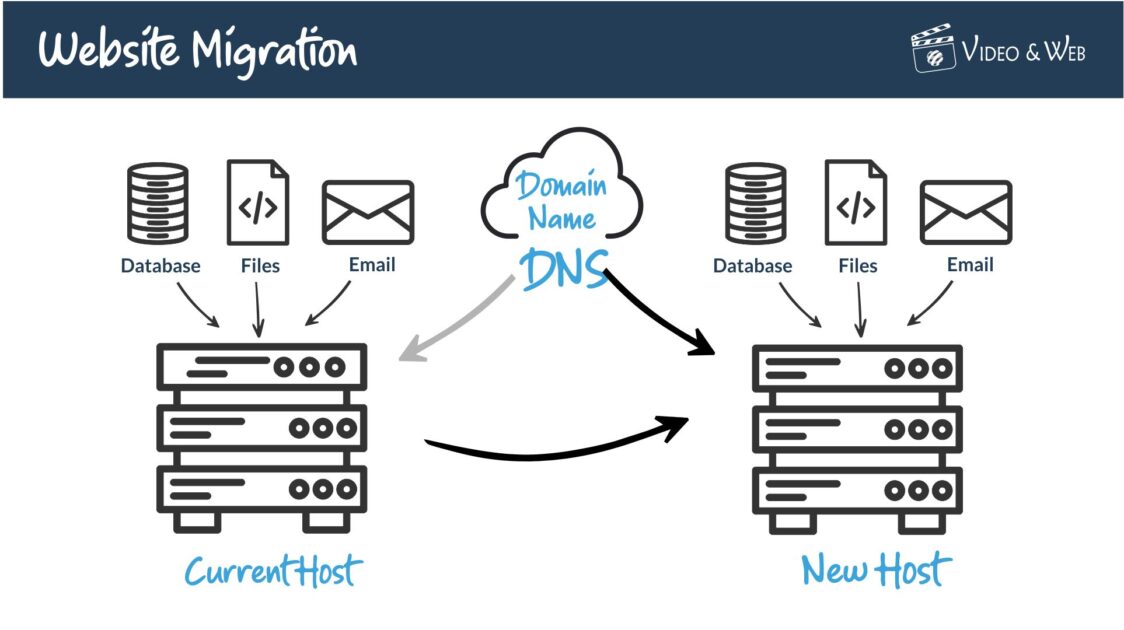
Remember, it’s not just the website files you need to move. Unless it’s a simple HTML static site, you will need to copy the FIles & Database. Depending on how your current service is set up, you may need to move your email accounts as well. As a final step, you will need to change your Domain Name Server (DNS) settings to point web traffic at your new host (you may even want to move where your domain name is hosted as part of your migration)
Here at Video & Web, we offer a free migration service complete with your own dedicated migration specialist who will help you to move your files, set up your site and ensure that the site and email functions correctly before you cancel your current hosting.

Research potential platforms
The best website migration plan is only as good as the platform you choose. Make sure you research potential hosting platforms and their requirements and capabilities. This includes the following:
- What types of hosting services does the platform offer?
- What is the hosting service’s supported database architecture?
- What software and programming languages does the hosting service support?
- What level of security does the hosting service offer?
- What level of support is provided during normal business hours?
- How large is the hosting company’s customer base?
- How long has the hosting company been around?
- Is the hosting company located in a data center close by?
- How much does it cost to migrate your site?
To ensure a smooth and safe transition, make you understand the technical specifications your website needs to run before committing to a new hosting company.

Not all servers offer the same speed and reliability
Determine if you need a migration or a new website
As with any big change, you will have to weigh the benefits of moving to a new platform against the costs. This includes the following:
- What will be the impact on your existing website?
- How long will it take to make the switch?
- What will be the cost of the migration?
- How much traffic will your site receive after the migration?
- How much will it cost to maintain the new site each month?
- What are the prospects of new customers or clients coming to your site after the move?
If you decide to go with a new website, you need to determine how you want to structure it. This will affect the look and feel of your site, and you will also need some time to work out what content you want to salvage from your old site and what you want to discard in the redesign.. You will also need to decide on a hosting platform and decide where to host the site.
Final preparations
There are many things you will need to do before you migrate your site. This includes the following:
- Make a list of all the files, images, and content you want to include on your new site.
- Remove or move any files, images, or content that is on a server that is being shut down or is no longer needed on your new server.
- Back up your existing server and website files. This includes your website files and database, as well as your server’s operating system and application software.
- Test your website on the new server to ensure that it is working correctly.
- Install any necessary logging or monitoring software on the server to ensure a smooth migration.
- Confirm that you have the appropriate login credentials for your server or website.
- Make any additional changes to your website or server that you think may be necessary.
- Create a schedule for regularly updating your website after the move.
Migrate your site
There are many different ways to migrate a site and they can vary greatly in complexity, cost, and effort involved. The following are just some of the more common methods used:
- Back up and migrate using a Content Management System (CMS)
- Install a new web host and point your domain name to the server
- Transfer your website files manually via FTP
- Use a hosting migration tool to automate the process
- Get free help with the migration from the team here at videoandweb.com
In conclusion
Website migration is a challenging and time-consuming process. It’s best to start the process a few months before you plan to migrate your site so that you have time to prepare.
Ensure proper procedure and all appropriate safety protocols to ensure a smooth and safe transition for all. This includes confirming that your current hosting company will still be able to accommodate your needs and that you have transferred the necessary server logins and credentials to your new hosting service.
Please contact us, if you would like to know more about our free migration service and how we can move your site with the minimum of fuss and interruption to your online business.
Need help turning this advice into action?
If you are reviewing your website, marketing or online visibility, we can help you work out what to improve first.
Related articles
 Websites
The History of Online Shopping
Online shopping has evolved from a curious experiment into a force that shapes how people live, work and connect. Explore it's history in this…
Read article
Websites
The History of Online Shopping
Online shopping has evolved from a curious experiment into a force that shapes how people live, work and connect. Explore it's history in this…
Read article
 Websites
Why do All Websites Look the Same?
If you are a regular surfer of the World Wide Web, you may wonder why all websites look the same. In this article, we…
Read article
Websites
Why do All Websites Look the Same?
If you are a regular surfer of the World Wide Web, you may wonder why all websites look the same. In this article, we…
Read article
 Websites
How to Post on WordPress
WordPress is one of the most popular Content Management Systems (CMS) on the internet. This guide will walk you through the basic steps and…
Read article
Websites
How to Post on WordPress
WordPress is one of the most popular Content Management Systems (CMS) on the internet. This guide will walk you through the basic steps and…
Read article
 VideoandWeb.com