
How to Set Up Gmail Filters To Make Your Life Easier
 Gmail is great for keeping track of incoming emails, but it can be challenging to keep up with everything that comes your way. There’s just too much email between work, family, friends, and social networks. If you’re overwhelmed by the number of messages you get, set up some filters to prevent yourself from going insane.
Gmail filters are a great way to handle your inbox and focus on the important messages. They’re beneficial if you get a ton of spam or marketing messages. You can set up filters to help you get back to the most important messages to you. Here’s how you can set up filters in Gmail.
The easiest way to set up a filter is to use an existing message. For example, you may want to route all emails from a certain sender to their folder in the future.
- Open Gmail.
- Tick the box next to the email you want to use as an example.
- Click More (the three dots at the top of the email window)
- Click Filter messages like these.
- Enter your filter criteria.
- Click Create filter.
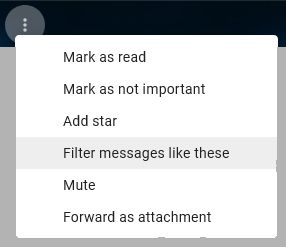
Filter messages like these at the top of the email window
Once you have selected a message, you can set up the criteria:
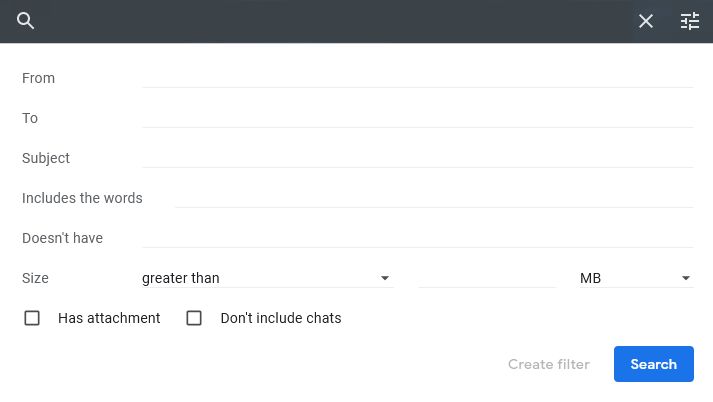
Set the criteria for the filter. Which messages do you want to apply this filter to?
And set up the action you want Gmail to take:
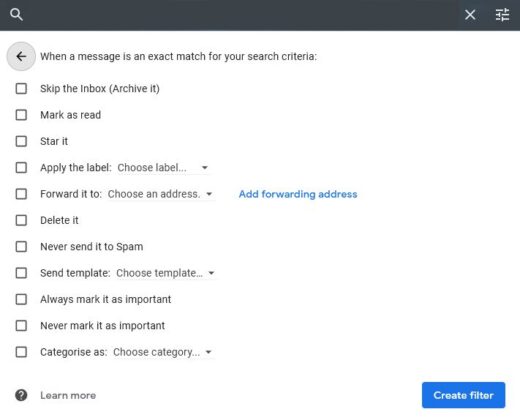
You then set up where you want the email to go. In specific folder, forwarded to another address, or something else.
Once you have set up your first filter you might want to set up more to help you to streamline your inbox. Here are some suggestions on how you might use Gmail filters to keep your inbox tidy.
Create a filter for important messages
If you’re constantly getting emails from salespeople, marketers, and other people trying to sell you something, set up a filter for important messages. Once you set it up, you’ll be able to easily ignore messages that don’t need to be a priority.
You can also use filters to help you prioritize your workload. For example, if you’re a student, you can set up a filter to only show messages from your tutors. Again, this will help you focus on the most important messages to you.
Set up a filter for important conversations
If you often get too many emails with the same subject line, you might consider setting up a filter for important conversations. All emails with a certain conversation will be grouped together in your inbox when you set this up.
You can use this to help you keep track of what’s happening with a particular project or person. For example, you and your team might be working on a project, and you’ll want to make sure you don’t miss any updates. You can set up a filter for important conversations to ensure you don’t miss anything.
Set up a filter for important emails
You can also use filters to help you prioritize important emails. For example, if you frequently get emails from vendors, senders with a “priority” designation, or emails that are more important than others, you can use filters to mark them as such.

Once you set up a filter for important emails, you’ll only see these messages in your inbox. So you’ll be able to quickly and easily focus on the important ones without worrying about the rest.
Create a filter for advertising messages
If you get many spam or promotional messages, you can use a filter to mark these as advertising and prevent yourself from getting overwhelmed. Unfortunately, spam has a habit of masquerading as legitimate emails, so you need to be careful about this.
While it’s important to report spam, you also don’t want to report legitimate emails as spam just because you’re annoyed with the message. So instead, create a filter that automatically marks any emails that contain “advertising” in the subject line as spam. Then, you can go through your spam folder and mark as much as you want as legitimate.
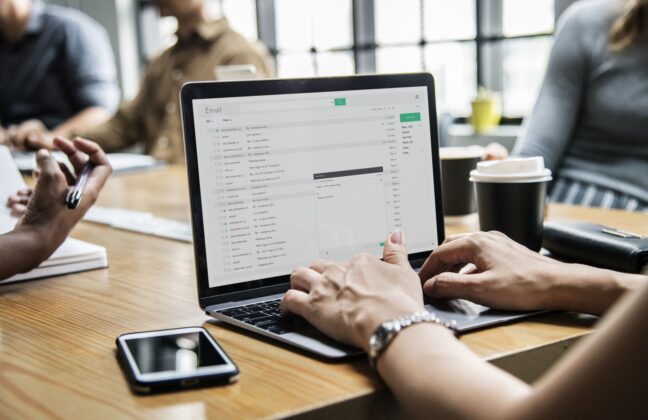
Gmail filters can help you to see the important emails, and avoid the spam!
Create a filter to fish useful emails out of Gmail’s spam filter
If you’ve spent any time in internet marketing, you’ve probably seen the term “spam filter” before. One of the advantages of using Gmail is that it uses Google’s resources to monitor what email is likely to be spam and put it straight in your spam folder.
Most of the time, that works brilliantly, but occasionally it can cause some problems, and you can lose some emails you need to see. For example, we have seen problems with emails sent by forms from our clients’ websites in the past.
These could be legitimate enquiries, so it’s imperative that the client gets to read them. The solution in Gmail is to set up a filter to route emails from the website address to the inbox. You could also send those to a specific folder.
Create a final filter for personal messages
Finally, you can create a final filter for personal messages. This is the catch-all filter that you should use if none of the other filters works for you.
While you won’t be able to see every message in your inbox, this final filter will help you ignore large swaths of unimportant messages. You can save yourself lots of time and hassle by using these techniques to set up Gmail filters.
Discover new filters you never knew you had
Once you get started using Gmail filters, you might notice other filters that you didn’t even know were there. Of course, you can set up almost any type of filter you want, so there’s a good chance that you don’t even know they’re there.
Here are some examples of filters you might not know you have:
- Filter from specific email addresses
- Filter when mail is to a specific email address
- Filter when the email subject line includes specific words
- Filter when the email doesn’t contain specific words
Finally…
Here are a few tips for setting up your filters: Once you create a filter, don’t change the filters’ settings unless you want to start ignoring messages from that person or those topics.
You may want to leave the original settings in place so that you don’t accidentally ignore anything important. Go through your spam and marketing folders regularly to ensure there aren’t any important messages. If you notice something in there, reply to it immediately to ensure it doesn’t get lost in the mix.
Gmail filters can be a great way to help you get control of your inbox. Once you get the hang of using them, you’ll wonder how you ever lived without them.
Further reading
The Seven Best Ways to Conduct Effective Zoom Meetings
Need help turning this advice into action?
If you are reviewing your website, marketing or online visibility, we can help you work out what to improve first.
Related articles
 Email Marketing
How Does Email Work? Our Beginner’s Guide
Email is an essential part of communication. Whether you run a business or just use it in a personal capacity, we use it every…
Read article
Email Marketing
How Does Email Work? Our Beginner’s Guide
Email is an essential part of communication. Whether you run a business or just use it in a personal capacity, we use it every…
Read article
 Content
Ten Great Ways for Small Businesses to Use PDFs
Small businesses constantly seek effective, cost-efficient ways to communicate with clients, manage operations, and share information internally. The PDF (Portable Document Format) has established…
Read article
Content
Ten Great Ways for Small Businesses to Use PDFs
Small businesses constantly seek effective, cost-efficient ways to communicate with clients, manage operations, and share information internally. The PDF (Portable Document Format) has established…
Read article
 Email Marketing
Why Email Marketing Should Have A Mobile-Friendly Design
With the rise of smartphones and other mobile devices, it has become crucial for businesses to adapt their marketing strategies to cater to a…
Read article
Email Marketing
Why Email Marketing Should Have A Mobile-Friendly Design
With the rise of smartphones and other mobile devices, it has become crucial for businesses to adapt their marketing strategies to cater to a…
Read article
 VideoandWeb.com