
How To Make Sure Your Website Isn’t Offline Forever
 How to make sure your website isn’t offline forever. If your website is down, it’s not just inconvenient. It’s an absolute disaster – it could cost you money. That’s why it’s essential to keep your website up, and running as smoothly as possible. Here are a few ways to make sure your website isn’t offline forever:
How Does a Website Go Offline?
When a website goes offline, it means that the server hosting the site is no longer accessible. This can happen for various reasons, including technical issues, power outages, domain name expiration, DNS issues, and human error.
It’s no secret that websites go offline all the time. In fact, it’s estimated that around 20% of all websites are down at any given moment.
If you’re worried about your website going offline, there are a few things you can do to prevent it.
What Should You Do If Your Website Goes Down?
If your website goes down, you should check your hosting account to see if it is still active. If it is, the next step is to check your domain name to see if it has expired. If it has, you will need to renew it in order to get your website back online.
If your hosting account and domain name are both active, then the next step is to check your website files to see if they are all intact. If any of your website files are missing or corrupt, you will need to restore them from a backup.
You need to monitor your site so you know when it’s down.
Even if you use an excellent web hosting service, things can still go wrong. That’s why it’s essential to monitor your website regularly.
If you are running a small business, you might not realise your website has been down for some time. It may only be when a customer says they couldn’t get on your site that you find out you have a problem.
There is something you can do about that; you can set up some Monitoring Tools. Then, if your site does go down, you’ll be alerted so you can take action to get it back up and running.
There are a few different ways that you can go about monitoring your website to make sure that it isn’t down for an extended period. The first way is to use a service like Uptime Robot, which will monitor your site and send you an alert if it goes down. As part of our maintenance packages, we monitor our client’s websites as standard.
Another way to keep tabs on your site’s uptime is to use Google Analytics. If your site’s traffic suddenly drops off, it could indicate your site is down.
You can also set up a cron job on your server that pings your site periodically to check if it’s up. If the cron job doesn’t receive a response from your site, it can send you an alert so you can take action.
Another reason why websites go down is because of server issues. Keep an eye on your server performance and address any issues as soon as they arise. If your website is hosted here at Video & Web, you can check our servers’ status anytime on our status page. Other hosts should offer a similar service.
Have a Backup.
No matter how well you maintain your website, accidents that take it offline can happen. That’s why it’s vital to have a backup system in place to quickly get your site back up and running if something goes wrong.
Having a recent backup will help you get back online quickly. Make sure to create backups regularly, so you’re always prepared.
If your site is built on WordPress, there are many plugins that can handle this for you automatically. There are a few different ways to back up your website. One popular option is to use a plugin like BackUpWordPress or WP Database Backup. These plugins will create a complete backup of your WordPress site, including your database and all your files. You can then store the backups off-site on a cloud storage service like Dropbox or Amazon S3.
Another option is to manually back up your WordPress database using phpMyAdmin. This is a bit more technical, but it’s not difficult to do if you follow instructions carefully. You can also use this method to export your database as an SQL file, which can be helpful if you need to move your WordPress site to a new host.
Whatever backup method you choose, it’s crucial to test it periodically to ensure it’s working correctly. The last thing you want is to find out that your backups are failing when you really need them!
Connecting to a Geographically Diverse Network.
If you’re looking to keep your website online as much as possible, one of the best things you can do is connect to a geographically diverse network. This means having your website hosted on servers in different parts of the world. That way, if one server goes down, your website will still be accessible from other servers.
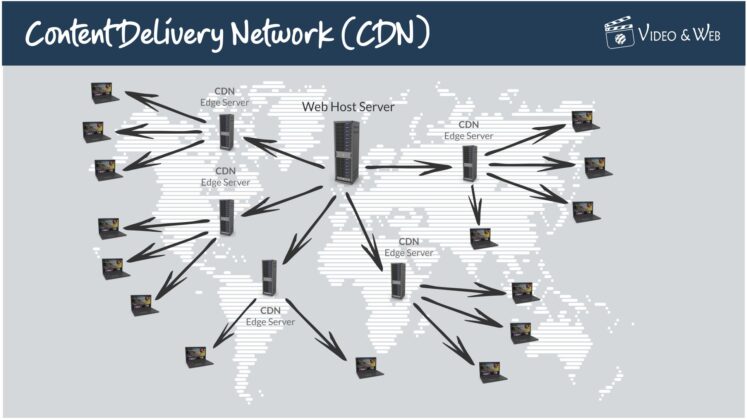 There are a few things to remember when connecting to a geographically diverse network. First, you’ll need to ensure that your website is designed to be hosted on multiple servers. This usually isn’t a problem for most websites, but it’s something to keep in mind.

Second, you’ll need to choose a hosting provider that has servers in multiple locations. Many reputable hosting providers offer this service, so finding one that meets your needs shouldn’t be challenging. Our hosting packages come with a Content Delivery Network (CDN) as standard with nodes all over the world.
Connecting to a geographically diverse network can help ensure your website stays online even if one server goes down. This is a crucial step in keeping your website up and running as smoothly as possible.
Firewalls and Anti-Virus Software.
Any website is vulnerable to attack, and your site could be Offline Forever if you don’t have the proper security measures in place. Two essential security measures are installing a firewall and anti-virus software.
A firewall helps to protect your website from outside attacks by blocking unwanted traffic. Many different types of firewalls are available, so you’ll need to choose one that’s right for your website. Anti-virus software helps to protect your website from malware and other malicious software that can wreak havoc on your site. Again, many different options are available, so be sure to choose one that’s right for your needs.
By taking these simple steps, you can help Ensure that your website stays online and protected from attack.
Server Load Balancing.
When it comes to keeping your website online, one of the most important things you can do is to ensure that your servers are adequately load-balanced. This means distributing the load (traffic, requests, etc.) across multiple servers so that no single server is overwhelmed and overworked.
There are a few different ways to achieve server load balancing, but one of the most common is to use a load balancer appliance. This physical or virtual device sits between your users and your servers. It intelligently directs traffic to the various servers to distribute the load evenly.
Another way to achieve server load balancing is through software that runs on your existing servers. This software will monitor the load on each server and dynamically route traffic to the less-loaded servers. This can be a very effective solution, but it does require some extra work on your part to keep it running smoothly.
No matter which method you choose, implementing proper server load balancing is essential for keeping your website up and running during times of high traffic.

Load Balancing prevents servers from getting overwhelmed with traffic
Other reasons for downtime – Domain Name issues, Hosting reliability & Software problems.
Your website can go down if the domain name doesn’t renew. To avoid this, you should be able to set it to renew at your domain host automatically.
Alternatively, make sure your domain name is registered multiple years in advance. This will help ensure that your site stays online even if you forget to renew it on time – and it’s also good for your SEO.
It’s essential to use a reliable web hosting service: One of the most important things you can do to keep your website online is to use a reliable web hosting service. There are a lot of great web hosts out there, but not all of them are created equal. So be sure to research and choose a web host with a good reputation for uptime and reliability, like Video & Web!
Finally, If your website is running with outdated software, it could be why your site is going down. Make sure to upgrade your software regularly to ensure maximum uptime.
Conclusion
By following the advice above, you can avoid having your website go offline forever. But, of course, even if you do everything right, there’s always a chance that something could still happen to take your site down.
That’s why it’s essential to have a backup plan in place to quickly get your site back up and running if anything happens.
Further Reading
The Importance Of Website Updates
Need help turning this advice into action?
If you are reviewing your website, marketing or online visibility, we can help you work out what to improve first.
Related articles
 Email Marketing
10 Ways to Increase Your Email Marketing Opens by 10%
Email marketing remains a powerful tool for engaging customers and driving business results. However, achieving high open rates can be challenging. Here are ten…
Read article
Email Marketing
10 Ways to Increase Your Email Marketing Opens by 10%
Email marketing remains a powerful tool for engaging customers and driving business results. However, achieving high open rates can be challenging. Here are ten…
Read article
 SEO
How To Improve Your Website’s SEO By Optimising Page Speed
In this blog post, we look at why faster is better when optimising page speed for SEO and how improving load times can greatly…
Read article
SEO
How To Improve Your Website’s SEO By Optimising Page Speed
In this blog post, we look at why faster is better when optimising page speed for SEO and how improving load times can greatly…
Read article
 Social Media
The Ultimate Guide to Social Media Analytics Tools
We've compiled this comprehensive guide to help you navigate the industry's top social media analytics tools currently making waves. From real-time monitoring to competitor…
Read article
Social Media
The Ultimate Guide to Social Media Analytics Tools
We've compiled this comprehensive guide to help you navigate the industry's top social media analytics tools currently making waves. From real-time monitoring to competitor…
Read article
 VideoandWeb.com